What is Form I-9?
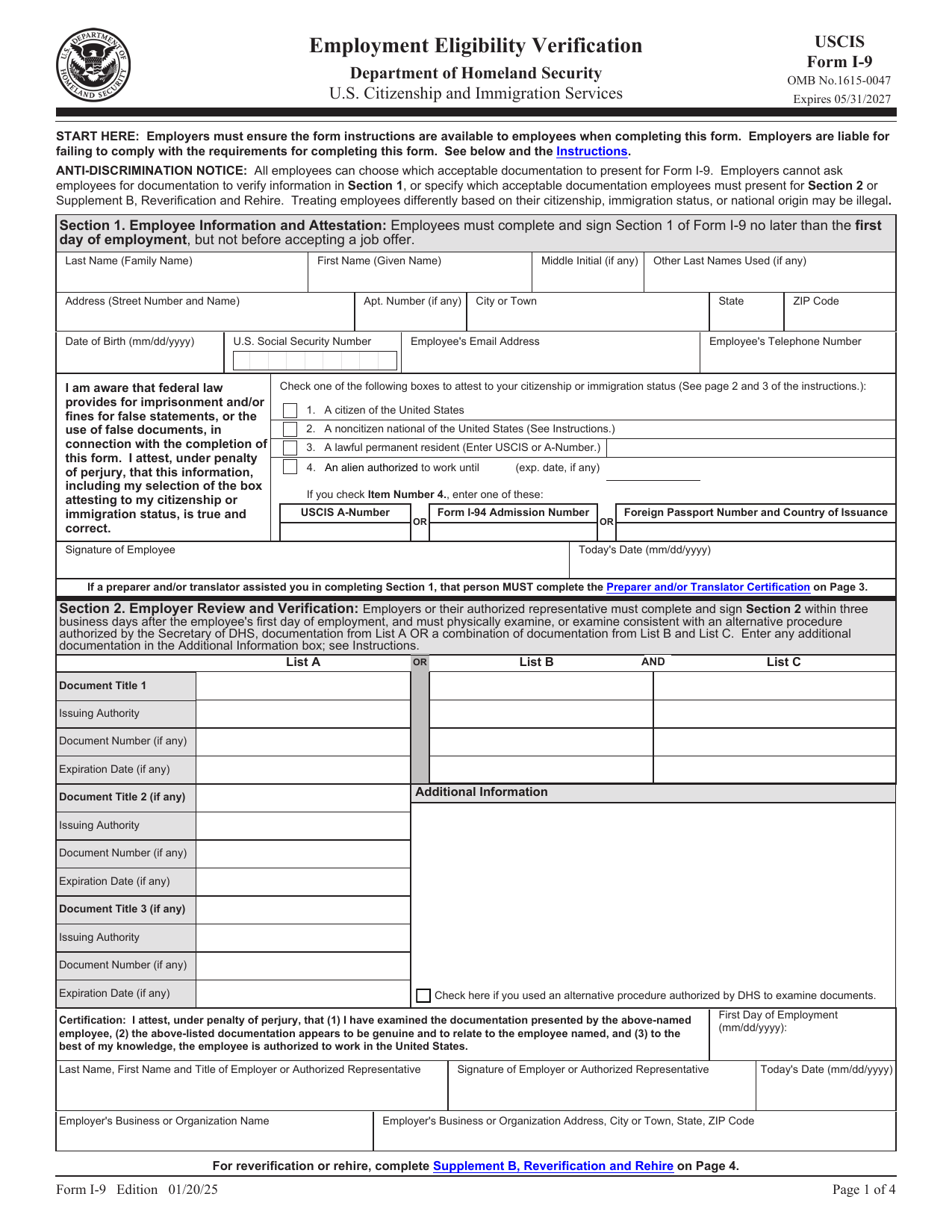
Form I-9, Employment Eligibility Verification, is a U.S. Citizenship and Immigration Services (USCIS) document used to confirm that a worker is authorized to work in the United States. Every employee hired in the US, citizen and noncitizen alike, must complete one.
The employee fills out and signs Section 1, and the employer reviews the employee's identity and work-authorization documents and completes Section 2. The current version is the edition marked 01/20/25, and it is the template loaded here.
What is Form I-9 used for?
Completing an I-9 is a legal requirement for hiring in the US. Here is what it does:
- Verifies the identity of every newly hired employee.
- Confirms that the employee is legally authorized to work in the United States.
- Creates the record an employer must keep on file and present if the government requests it. The form is not filed with USCIS.
Who needs to complete Form I-9?
Both the employee and the employer have a part to play. You complete an I-9 when:
- You are hired for a job in the United States, whether you are a citizen or a noncitizen authorized to work.
- You are an employer hiring anyone for employment in the US, including for short-term or part-time work.
- An existing employee is rehired or needs reverification, using Supplement B.
Independent contractors and unpaid volunteers generally do not complete an I-9.
Section 1, Section 2, and the supplements
Form I-9 is split into parts that different people complete:
- Section 1, Employee Information and Attestation: completed and signed by the employee.
- Section 2, Employer Review and Verification: completed by the employer after examining the employee's documents.
- Supplement A: used when a preparer or translator helps the employee fill out Section 1.
- Supplement B: used for reverification or when rehiring a former employee.
Acceptable documents (List A, B, and C)
To prove identity and work authorization, an employee presents either one document from List A, or one document from List B together with one from List C:
- List A establishes both identity and work authorization, for example a U.S. passport, a Permanent Resident Card, or an Employment Authorization Document.
- List B establishes identity only, for example a state driver's license or a government-issued ID card.
- List C establishes work authorization only, for example a Social Security card or a birth certificate.
The employee chooses which acceptable documents to present. An employer cannot require specific documents.
How to fill out Form I-9
Open the form above and work through Section 1 line by line:
- Enter your legal last name, first name, and middle initial, plus any other last names used.
- Add your address, date of birth, and, if you have one, your U.S. Social Security Number, email, and phone.
- Check one box to attest to your citizenship or immigration status.
- If you are a lawful permanent resident or an authorized noncitizen, add the USCIS, A-Number, or other required details.
- Sign and date Section 1 to complete your attestation.
- If someone helped you fill it out, they complete Supplement A.
Your employer completes Section 2 after reviewing your documents. The editor guides you field by field, so you will not miss a required box.
When is Form I-9 due?
The I-9 has two strict deadlines. The employee must complete and sign Section 1 no later than the first day of employment, but not before accepting a job offer. The employer must complete Section 2 within three business days of the employee's first day of work.
Employers must also keep each I-9 on file for three years after the date of hire or one year after employment ends, whichever is later.
Where to get a blank Form I-9
A blank, current Form I-9 is a public-domain document published by USCIS. You can use the official Edition 01/20/25 template loaded on this page, fill it in, and download it without visiting any government site or creating an account.
How to sign it online
You can sign your I-9 electronically right in the editor. Draw, type, or upload your signature, place it in the signature box of Section 1, add the date, and your attestation is complete. The signed PDF is ready to hand to your employer.
Where to send it and how long to keep it
Form I-9 is never sent to USCIS or any government agency. The completed form stays with the employer, who retains it and presents it only if an authorized government officer requests an inspection.
lumr is not affiliated with USCIS or the Department of Homeland Security. Form I-9 is a public-domain document of U.S. Citizenship and Immigration Services.