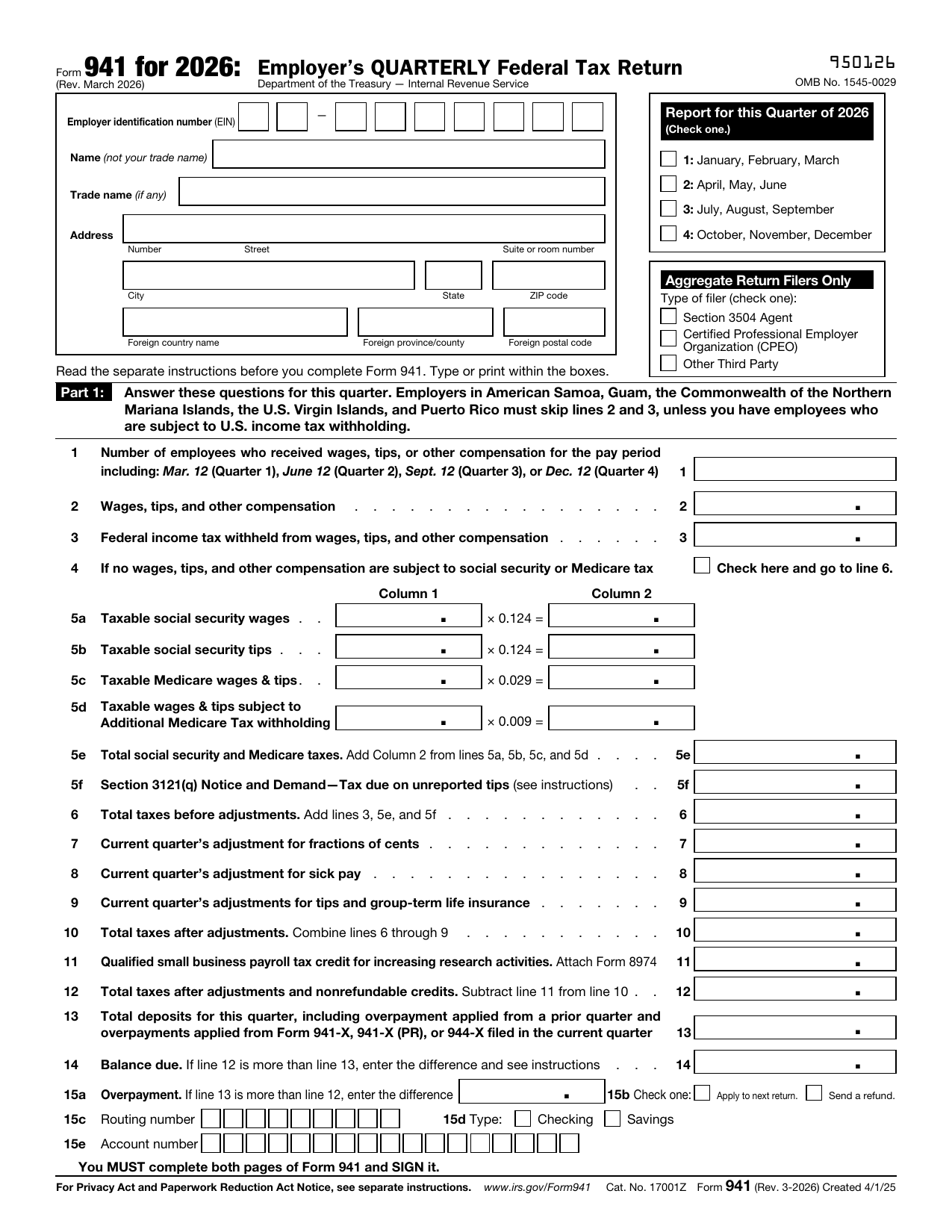
What is Form 941?
Form 941, Employer's Quarterly Federal Tax Return, is the IRS form employers use to report the wages they paid, the federal income tax they withheld, and both the employer and employee shares of Social Security and Medicare taxes for a calendar quarter.
Employers file Form 941 four times a year to reconcile payroll taxes with the deposits they already made. The version loaded here is the official Rev. March 2026 form.
What is Form 941 used for?
Form 941 reports your payroll tax activity for one quarter. It is used to:
- Report total wages, tips, and other compensation paid to employees.
- Report federal income tax withheld from employee paychecks.
- Calculate Social Security and Medicare taxes, including the employer and employee shares.
- Reconcile the total tax for the quarter against the deposits you already made.
What information do you need?
Before you start, gather the following:
- Your Employer Identification Number, business name, and address.
- The quarter you are reporting and the number of employees paid in it.
- Total wages, tips, and other compensation for the quarter.
- Federal income tax withheld from employees.
- The taxable Social Security and Medicare wages, and a record of the deposits you made for the quarter.
How to fill out Form 941
Open the form above and work through it part by part:
- Enter your EIN, name, address, and check the quarter you are reporting.
- Part 1: report the number of employees, wages, and federal income tax withheld.
- Part 1: figure Social Security and Medicare taxes and your total tax for the quarter.
- Compare total tax with your deposits to find a balance due or an overpayment.
- Part 2: report your deposit schedule and tax liability.
- Part 3 and Part 4: answer the questions about your business and any third-party designee.
- Part 5: sign and date the return.
The editor guides you field by field, so you can fill in each line without missing a required entry.
Filing the return vs depositing the tax
Form 941 reports your payroll taxes, but it is usually not how you pay them. Most employers deposit federal payroll taxes during the quarter on a monthly or semiweekly schedule, separately from the return:
- Deposits are generally made electronically through the Electronic Federal Tax Payment System.
- Your deposit schedule, monthly or semiweekly, depends on your reported tax history.
- Part 2 of Form 941 reports the deposit schedule and your liability for the quarter.
- A small balance due can be paid with the return, but ongoing taxes should be deposited, not held until you file.
Who needs to file Form 941?
Most employers who pay wages subject to federal income tax withholding or Social Security and Medicare taxes file Form 941 every quarter. You generally file even for a quarter with no tax to report, unless you fall into an exception. Different rules apply if you:
- File Form 944 annually because the IRS notified you that you qualify.
- Employ only household workers, who are reported on Schedule H.
- Employ only farmworkers, who are reported on Form 943.
- Are a seasonal employer with no wages in a given quarter.
When is Form 941 due?
Form 941 is due by the last day of the month following the end of each quarter:
- Quarter 1, January through March, is due April 30.
- Quarter 2, April through June, is due July 31.
- Quarter 3, July through September, is due October 31.
- Quarter 4, October through December, is due January 31.
If you made all your deposits on time and in full for the quarter, you get an extra 10 business days to file. When a due date falls on a weekend or holiday, it moves to the next business day.
Where to get a blank Form 941
A blank, current Form 941 is a public-domain document published by the IRS. You can use the official Rev. March 2026 template loaded on this page, fill it in, and download it without visiting a government site or creating an account.
How to sign it online
You can sign your 941 electronically right in the editor. Draw, type, or upload your signature, place it in Part 5, and add the date and your title. The signed PDF is ready to keep or file.
Where to file Form 941
You file Form 941 with the IRS, either electronically through an approved provider or by mailing the paper return. The correct mailing address depends on the state your business is in and whether you are enclosing a payment, so check the address list in the IRS instructions before you mail it.
lumr is not affiliated with the IRS. Form 941 is a public-domain document of the U.S. Internal Revenue Service.